
Last updated: July 2026
At some point almost everyone gets curious about this usually right after realizing someone noticed you were “last seen 2 minutes ago” and didn’t get a reply. Fair or not, that little timestamp causes more relationship drama than it has any right to.
The setting itself isn’t hidden or complicated. It’s under Settings → Account → Privacy → Last seen and online. You get four choices: Everyone, My Contacts, My Contacts Except, Nobody. That’s it. Where it gets slightly annoying is that the menu looks a bit different depending on whether you’re on Android, an iPhone, WhatsApp Web, or the desktop app so I’ve laid out each one separately below.
What “Last Seen” Actually Shows
It’s just a timestamp for when someone last had the app open. Nothing more. It updates when they close WhatsApp or their connection drops.
People mix this up with read receipts constantly, so to be clear last seen has nothing to do with whether your message was read. That’s the blue checkmarks. And it’s not the same as the typing indicator either, which only shows while someone’s actively typing.
One thing that trips people up: this is a two-way street. Turn off your last seen, and you stop seeing everyone else’s too. WhatsApp doesn’t let you peek without also being hidden.
Why Bother Hiding It
Reasons vary. Sometimes it’s a partner reading way too much into a gap between “online” and “replied.” Sometimes it’s a boss who expects an answer at 9pm because they saw you were active five minutes ago. And sometimes there’s no dramatic reason at all some people just don’t like being trackable by default, and that’s a completely reasonable position on its own.
Whatever your reason, there’s basically zero downside to turning this off. Worst case, someone asks why they can’t see your last seen anymore.
The Four Privacy Levels
- Everyone — anyone with your number sees it, no restrictions.
- My Contacts — only saved contacts can see it.
- My Contacts Except — same as above, minus specific people you pick.
- Nobody — invisible to all.
Quick note: this only touches last seen and online status. Your profile photo and About text are separate toggles in the same menu, so don’t assume hiding one hides the other. It doesn’t.
Android
Tap the three dots top-right, go to Account, then Privacy, then Last seen and online.
Pick your level. If you’re only trying to dodge one specific person, use My Contacts Except and add their name to the excluded list rather than going full Nobody no reason to hide from your whole contact list over one person.
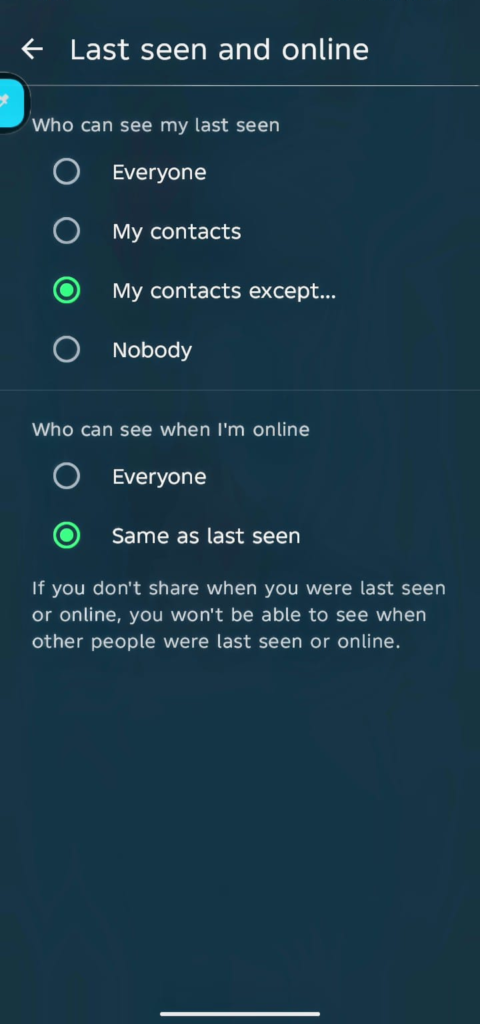
Here’s the part people miss: online status usually follows whatever you picked here, but not always automatically. Scroll down to Who can see when I’m online and set it to “Same as last seen” if you want both locked together. Skip this step and you might hide your timestamp but still show up green and active in real time, which honestly kind of defeats the point.
No save button, changes apply instantly, syncs to your linked devices on its own. If any of these options are missing, update the app through the Play Store first.
iPhone
Same idea, different layout. Gear icon → Account → Privacy → Last Seen, then choose your setting.
Nobody hides it from everyone. My Contacts Except is the more surgical option. Tap Done once you’re finished picking names.
Worth knowing: this same screen usually bundles read receipts in with it, so glance at that too before you back out you might be changing more than you meant to. Also, if you’ve already blocked someone, none of this matters for them; blocking already made your last seen invisible regardless of any other setting.
WhatsApp Web
Click the profile icon, top of the sidebar. Settings → Privacy → Last Seen and Online, pick Nobody (or whatever level you want).
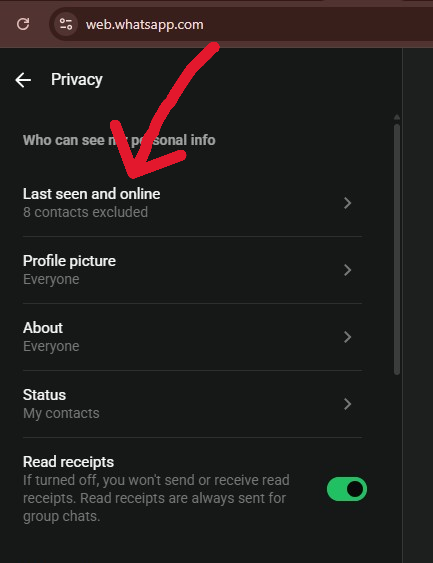
This isn’t really a separate setting so much as a mirror of your phone’s no extra QR scan, nothing new to link. Works the same in Chrome, Edge, whatever browser you use.
Desktop App (Windows / Mac / Linux)
Menu icon → Settings → Privacy → Last seen and online → Nobody.
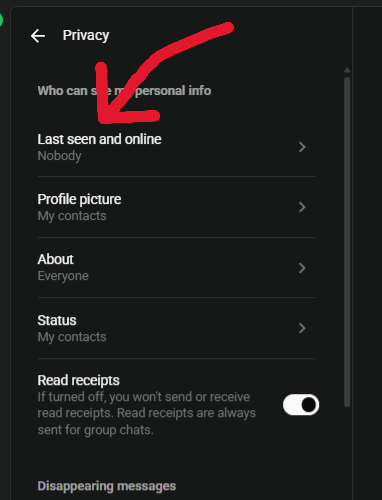
This used to require sketchy browser extensions back when the desktop app didn’t support it natively. Glad that’s gone, honestly those extensions were never a great idea security-wise, even when they were the only option.
Excluding Specific People Without Going Fully Invisible
If your goal is “hide from my ex, not from everyone,” My Contacts Except is built exactly for that. Settings → Privacy → Last Seen → My Contacts Except → pick names.
Same reciprocity rule applies here too exclude someone and you lose visibility into their last seen as well. And don’t bother with apps promising more granular control than this. WhatsApp doesn’t support per-chat last seen settings officially, and any app claiming otherwise is almost certainly violating their terms, which risks your account getting banned outright.
What Actually Happens Afterward
The person you’ve hidden from just sees a blank space where the timestamp used to be. No popup, no alert WhatsApp genuinely doesn’t tell anyone when you change a privacy setting.
Everything else keeps working normally. Messages still deliver, calls still connect. The only real trade-off is losing their last seen too, assuming it’s mutual (which, with this setting, it always is).
Hiding Online Status Too
Last seen hidden doesn’t automatically mean you look offline. If someone’s chatting with you live, they might still catch that green “online” tag.
Go back into Privacy and find Who can see when I’m online, set it to match your last seen (or Nobody, depending on your app version). If you want to go further replying without leaving any trace of activity at all some people just answer from the notification panel without fully opening the app, or flip on airplane mode first. Not an official feature, more of a workaround, but it works.
Typing and Recording Indicators Can’t Hide Those
No toggle exists for this one. The “typing…” bubble and the voice-recording indicator show up live no matter what your other settings are.
Airplane mode before you start typing is really the only workaround write your reply, then reconnect and send. Anything claiming to disable this indicator officially is lying, basically, and probably breaks WhatsApp’s terms in the process.
Checking Whether It Actually Worked
WhatsApp won’t confirm anything for you, so the easiest way to check is from someone else’s phone a friend not on your excluded list, or a second account if you’ve got one.
Blank timestamp means it worked. Give it a minute or two if you’re checking across linked devices, sync isn’t always instant.
Third-Party “Stealth” Apps Just Don’t
These apps almost always ask for permissions that have nothing to do with hiding a timestamp microphone access, storage, sometimes even your location. That’s not a coincidence. Best case they’re pointless, worst case they’re harvesting your data or planting malware.
They also violate WhatsApp’s Terms of Service pretty directly, which is a fast way to get your account suspended over something you didn’t even need. If you want real security here, stick to what WhatsApp actually offers: two-step verification, plus a decent VPN if you’re on public wifi a lot.
Spotting When Someone Else Has Hidden Theirs
If a contact’s timestamp used to show and now it’s just gone, that’s usually your answer they changed the setting, or blocked you outright. A message that’s stuck on a single grey checkmark forever can be another hint, though not a guaranteed one.
This only applies to people you’ve actually chatted with before, by the way. No chat history, no last seen visible, regardless of their settings. And group chats never show individual last seen times at all don’t bother checking there.
Hiding vs. Blocking
Different tools, different jobs. Hiding limits what someone can see messages and calls still go through fine. Blocking kills the connection completely: no delivered messages, no calls connecting, you disappear from their status tab and they can’t add you to groups anymore.
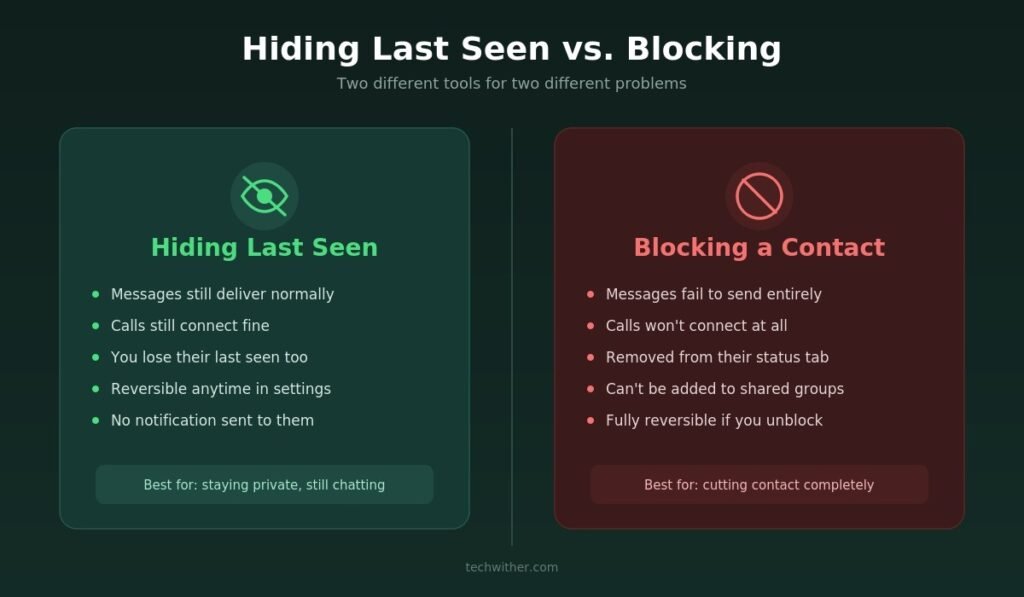
If you still want to talk to someone but just want some privacy, hide. If you want them gone entirely, block.
FAQ
Does WhatsApp tell someone when I change this setting?
No. They’ll just notice the timestamp is gone no alert gets sent either way.
Can I hide it for just one chat instead of everyone?
No, it’s an all-or-nothing account setting. No per-chat control here, unlike disappearing messages.
Does WhatsApp Business work any differently?
Not really same privacy rules apply regardless of account type.
Will this carry over if I get a new phone?
Yes, it’s tied to your account on WhatsApp’s servers, not the device, so restoring a backup keeps your setting intact.
Can people still tell I’m active even with last seen off?
Yes, if your online status is set separately and still visible. Lock both settings together to close that gap.
Why do I see some people’s last seen but not others?
Could be a few things they changed their setting, blocked you, aren’t in your contacts, or you’ve simply never messaged before.
Does this affect read receipts or delivery ticks?
No, those are controlled separately and don’t change based on your last seen setting.
Can I fake a last seen time?
No official way to do this. Anything claiming otherwise isn’t a real WhatsApp feature.
Can I see who’s viewed my last seen?
No tracking exists for this at all it’s a passive timestamp, nothing more.
They have me saved, I don’t have them can they see my last seen?
Depends on your setting. If it’s “My Contacts,” they’d need to be saved on your end too, not just theirs.
Good